
How well do you leverage your alumni network?
LinkedIn has long provided ways for you to search for and connect with fellow alumni. The new alumni mapping tool makes it easier to start with your pool of alumni (or alumni from a different school) and then drill down to find people with the connections and/or skills you are looking for.
The alumni mapping tools gives you a variety of ways to “slice and dice” alumni data. By default, LinkedIn filters the list by the schools and years of attendance from your profile. Using the dropdown selectors at the top of the page you can select either years attended or graduated. The “Change Schools” button allows you to view other schools you attended or any other school:

The next section of the tool provides you summary categories about the alumni group.

Categories include:
- Where they live
- Where they work
- What they do
- What they studied
- What they are skilled at
- How you are connected
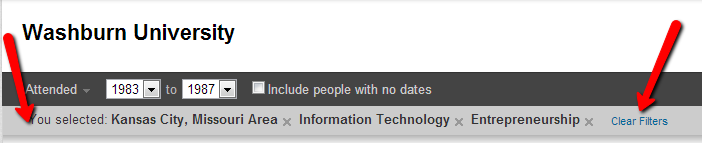
Clicking on a category adds a filter, narrowing the connection results. Filters can be used in combination (where they live + what they do). You can view (and clear) your filters in the light gray bar underneath the attendance selectors:
Below the categories section you will see the “cards” of connections matching your criteria.
This post on the LinkedIn blog provides some example of how you can use the new alumni mapping tool to tap your network to get advice related to choosing a college or major as well as finding a new job.
The alumni mapping tool can also be a great way for small business owners to enhance their networking efforts. Here are just a few examples:
- Using the “Where they live” and “What they do” or “What they are skilled at”, you can find local vendors for goods and services you need.
- Similar to #1 above, you can find alumni who make good strategic referral partners for your group.
- Do you have a list of companies that represent “dream customers” for your business? Use the “Where they work” filter to find a possible introduction.
- Travelling out of town for business? Get recommendations on where to stay or where to eat from fellow alumni.
Those are just a few possibilities – share your tips and ideas for using the LinkedIn Alumni Mapping tool in the comments below.