
Quick question – how many LinkedIn followers do you have?
Not connections. Followers.
I’m not asking because there is some magic number of followers you should want. I’m asking because I talk to a lot of people who didn’t know they had followers — and when they checked they found out they had quite a few.
Don’t feel bad if you don’t know much about LinkedIn followers. You don’t get any notice when someone follows you. You may have thought followers were the equivalent of connections for company pages. That was true once, but then LinkedIn (sort of) took that away. More on that below.
The important thing to know is that you probably do have followers. And some of those followers could be just the people you need to turn your network from meh to awesome!
LinkedIn Followers VS. Connections
So what’s the difference between a follower and a connection on LinkedIn?
When you connect with someone on LinkedIn, you are able to see their updates and what they share. You see these in the feed on your LinkedIn homepage. The person you connected with will see your updates and shares on their homepage.
You and your connection can also send messages to one another on LinkedIn.
When you follow someone on LinkedIn, your will see their posts and articles on your homepage. However, the person that you followed won’t see your posts.
For more information on differences between LinkedIn followers and connections, visit the LinkedIn help center.
How to Find Your Followers on LinkedIn
Note – LinkedIn makes changes to their platform on a regular basis. If you notice that these instructions no longer work, please let me know and I will update them (when possible – sometimes they take things away)
To see who is following you on linkedIn, you can either click on this link (you may want to bookmark it)
https://www.linkedin.com/feed/follow/
and then go to Step 3 below
OR
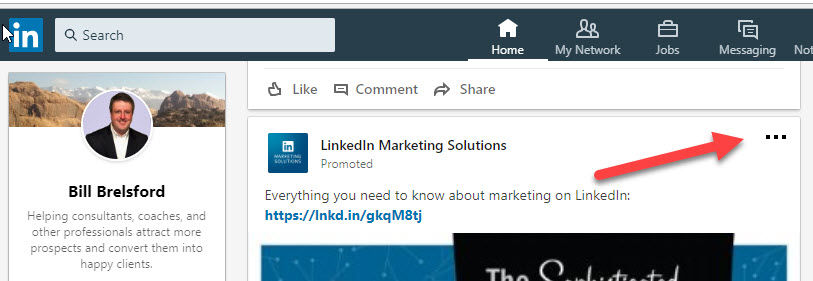
Step 1 – Go to any post in your feed. Click on the 3 dots (…) in the upper right hand corner
Step 2 – Click on “Improve my feed”

Step 3 – Click on “Followers”
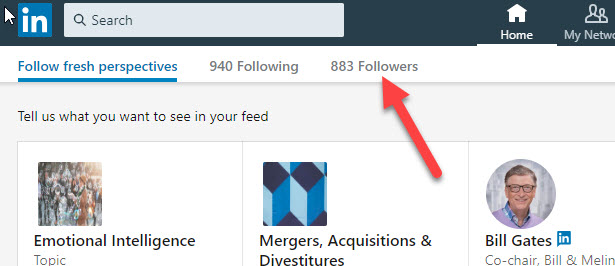
After you click on the Followers link, you will see a grid display of all the people who are following you.
You will note that this list INCLUDES people who are your first degree connections. Therefore, if you want to find the people who are following you but who are not connections, you need to take one more step.
Step 4 – Look for the + Follow link
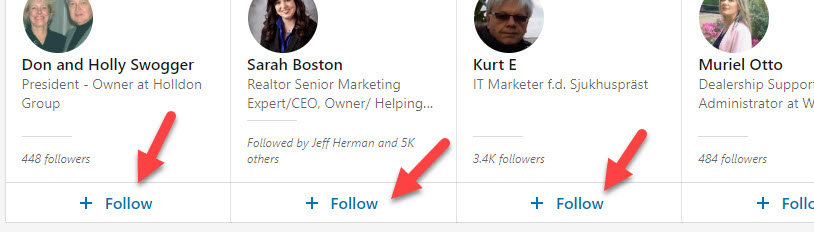
If you see the + Follow link, that means you are not following this person nor are you connected to them.
Company Page Followers
I’m fairly sure (I can’t remember exactly) that LinkedIn following actually started with the ability to follow companies. This gave you a way to keep up with a companies updates, since you can’t have a 1st degree connection with a company. Ironically, LinkedIn no longer provides a way to view who is following your company. They used to have that feature, but they took it away.
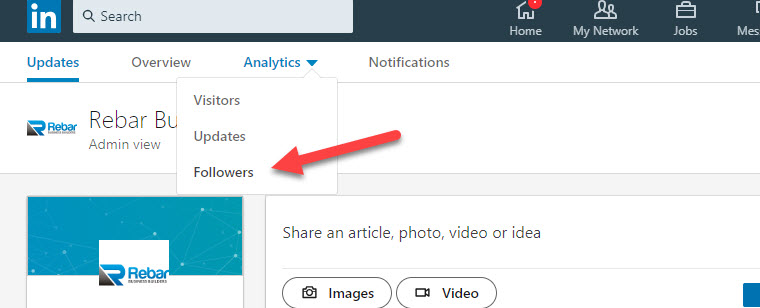
You can keep track of the number of people who follow your company page via your pages analytics. Here’s how. First navigate to your company page. Assuming you are an admin of your page, click on Analytics on the admin menu bar and select Followers.
Since we can’t see the individual followers of our company at this time, the rest of this post won’t pertain to company followers.
Adding LinkedIn Followers to Your Network
Now that you know who is following you on LinkedIn, it’s time to connect with them. Or at least decide if you want to try to connect with them.
There are many reasons why someone may have chosen to follow you on LinkedIn, rather than trying to connect with you. There are many reasons why you may or may not want to try to connect with your followers.
Some people will tell you that your list of followers is a list of leads. They may even characterize them as “warm leads” arguing that these are people who know, like, and (maybe even) trust you.
However, not everyone who follows you is a lead. For example, your followers may include:
- Competitors wanting to keep an eye on you
- Personal friends who have no need for your services
- Recruiters looking to fill jobs
- Sales people who think you may be a good lead for them
It may be hard to remember, but LinkedIn wasn’t built to be a directory of leads. It was built to facilitate the building and nurturing of your network. So when reviewing your list of followers, try to determine who may be a good addition to your network.
For example, let’s say one your followers is a competitor. Would you ever want to connect with a competitor? Well, it depends, right?
Let’s say ABC Consulting sells a similar service to the one your company provides. However, they sell to a completely different audience than yours. Could there be opportunities for the two of you to exchange referrals? Would it make sense to compare notes on sales and marketing? Find out what works for them, what conferences they attend, what their favorite resources are?
Speaking of referrals, are their people on your list of followers who serve the same audience as you, but with different products and services? If you train software development teams how to better manage their projects, does it make sense to connect with people selling SAAS project management tools to the same audience?
The point I’m trying to make here is this — when reviewing your list of followers, don’t just look for potential leads. I believe you are short changing yourself if you do. Rather, look for opportunities to build mutually beneficial relationships – leads, centers of influence, referral partners, former clients, charitable organizations doing work you believe in, etc.
Make it a Habit
Now that you know about LinkedIn followers, make it a habit to review your followers and (when it makes sense) invite them to connect and join your network.